Friday, June 8, 2012

10 Great Digital Camera Tips And Tricks


By David Elrich | Digital Crave – Tue, May 1, 2012
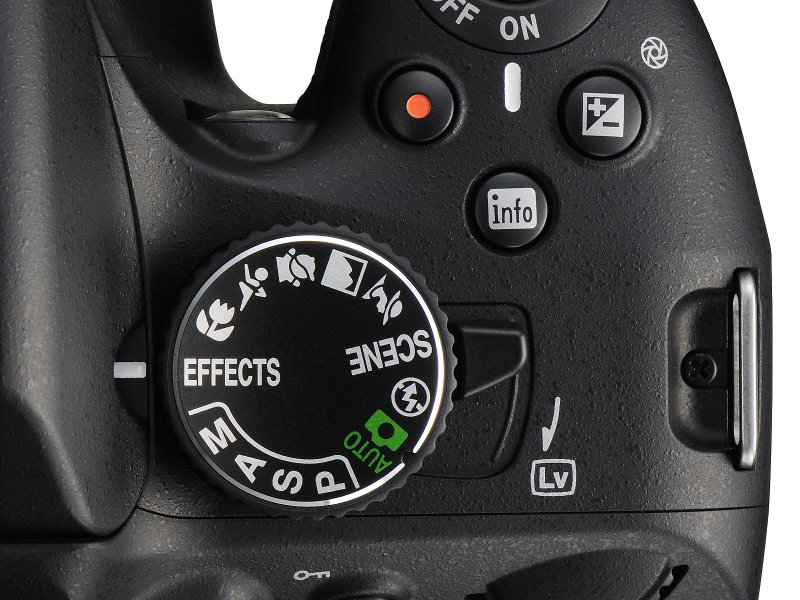
Nikon Mode Dial

Digital cameras have been around for years yet even those on their first—or fifth—camera will take better photos and videos if they follow these simple pointers.
Check Your Settings Before You Press the Shutter
No matter if you have a basic point-and-shoot like the Canon PowerShot 300 HS or an advanced Nikon D7000 DSLR, the first thing you absolutely must do is check your camera settings right after you press the "on" button. The last time you used it might've been at night or indoors and you left the settings for that type of shot. Or your kids/partner/whomever was using it and fiddled with the buttons and dials. This can ruin your next series of shots if the conditions aren't right, perfect for a Homer Simpson D'oh! moment.
Make sure you start off in Auto/intelligent auto then make the changes you like—if any at all. Many of today's newer cameras have very sophisticated intelligent auto settings. Make sure you use them to avoid "shoulda coulda" moments.
Speed Up Your Camera
One of the biggest camera complaints—especially for affordable compacts—is speed or lack of it. You can't turn a Focus into a Ferrari but you can enhance shot-to-shot time so you aren't twiddling your thumbs waiting for the camera to take another photo.
First find the "burst" or continuous mode in the menu system and engage it so the camera automatically clicks as fast as it can. Then make sure you disable the Review Photo setting which automatically puts your last image on the LCD screen for you to check out. These two changes will make you feel like you have a new camera. And while you're at it, make sure you have a "speed rated" memory card which will also improve response as it takes less time saving images to the card. Since they're so affordable, look for Class 6 or greater SD cards.
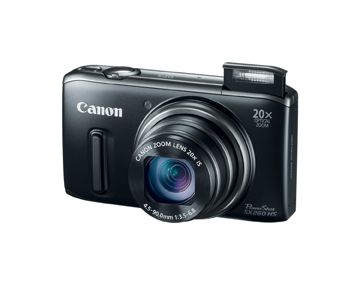
Flash up with Canon 260 HS
Great Portraits—Almost Every Time

Your camera's built-in flash should be used for more things than indoor birthday parties. The next time you're taking a portrait, make sure the flash is set to "Fill Flash" or "Forced Flash," depending on your specific model. Now the flash will fire when you press the shutter and evenly illuminate the targeted face, eliminating any shadows.
Also use this setting when you're outdoors at the beach or a picnic, especially if there's strong sunshine and harsh shadows. Simple but it works like a charm.
One of the Biggest Things To Avoid
Digital Zoom. Although you can extend your camera's basic zoom using this feature your pictures will look awful. With a digital zoom a center portion of the view screen is enlarged, adding loads of yucky digital artifacts especially at extreme ranges. Make sure it's turned off.
Battery-Saving Tricks
There's nothing worse than a dead battery at the critical moment. Obviously, charge your camera overnight before you hit the streets. However there are ways to squeeze some extra life from your battery if you see a warning. If your camera has Wi-Fi or a built-in GPS, turn them off completely. Also if you have optical image stabilization, turn that off too. You may get a shaky shot but at least you'll have something.
Turn down the brightness of the LCD screen too. Remember that Review Photo setting mentioned earlier? Make sure that's turned off as well. Don't turn your camera on and off in hopes it'll last longer—it won't as you use more juice booting up your camera. Also most cameras have a sleep mode; cut the time to around a minute.
Turn This On
Grid Lines are hidden on many cameras and they're well worth using. Typically when you're framing a shot on the LCD screen, you should keep the horizons straight but it's hard to do properly. With grid lines--typically a white tic-tac-toe pattern overlaying the screen—you can do it easily by lining up the horizons. Landscapes, group shots and vertical images will look much more professional.
Always Shoot Best Quality
You would think manufacturers set cameras at best quality as the default for stills and videos but unfortunately this is not always the case. Make sure image quality (resolution or pixels) is the highest available then check compression, if it's available. Here you might see a number of stars, or words like Good, Better, Best. Always choose the highest level since less compression means fewer digital artifacts--in other words a more accurate image. The same holds true for movies.
Remember it's always better to have a high-quality original and downsize it using your own software after the fact. Social media sites will automatically re-size your shots for quick uploads so quality isn't super critical here but if you want to make big prints for an album or scrapbook, it's important to have as many pixels as possible.
Don't Be So Sensitive
Manufacturers love to brag about the sensitivity of their cameras, claiming they can shoot in very low light. In some cases this is true but in most it's not. Sensitivity is measured by an ISO rating, ranging from 100 to 16,000 or more. When a camera is in Auto, it'll pick the ISO setting and in low light, it will use the highest number. For many models, particularly point-and-shoots, this is a recipe for disaster as digital noise—speckles—are introduced to the image and color shifts so it's barely recognizable.
If your camera has an ISO limit, set it to a maximum of 400 or 800 since your results will be much more pleasing. If you're feeling adventurous, I suggest you do some informal testing of the various ISO settings indoors without the flash. Review them on your monitor and see where the quality falls off. I've used cameras where 400 is the limit, others where 3200 or 6400 is solid.
Hollywood Tips
Hollywood DPs (Directors of Photography) work for years perfecting their craft but you can capture clips that are just fine for YouTube and the family HDTV. First, keep your camera horizontal at all times, set to best quality and with image stabilization engaged (if available). Resist the urge to quickly zoom in and out and do not abruptly move it from side to side. If you want to pan a nice landscape, always move the camera from left to right and do it slowly.
Play Is Good
The beauty of every digital camera is the simple fact you can take hundreds of shots almost instantly. You can press any combination of buttons you want and even if your photos are ready for the Delete pile, just erase them and start all over again. Cameras are very forgiving, even if you think they'll never work properly again.
Press Menu, go into Setup and hit Reset All if you're really lost in the digital woods. Your camera will now have the manufacturer's defaults and you can start all over again. And in the rare instance your camera freezes up, take out the battery, pop it back in again and hit the power button. Things should be as good as new.

Info : http://sg.news.yahoo.com/blogs/digital-crave/10-great-digital-camera-tips-tricks-174146195.html

Top 7 most overrated health foods


Whether through word of mouth, the media or advertising we are frequently exposed to claims about the best foods to eat. However, these claims are often exaggerated or simply untrue. Don’t be fooled by the hype by checking out these overrated foods


Overrated health food 1: Acai berry juice


Health magazines rave over it and celebrities apparently swear by it, so should you be drinking acai berry juice too? Well, research suggests that this self-proclaimed “superberry” may not quite live up to its hype. Although the berry itself is nutritious, it is difficult to get hold of in its fresh form. Furthermore, studies suggest that the juice only has average health benefits when compared to that of other fruits. In fact, acai berry juice was found to be lower in antioxidants than pomegranates, blueberries and red wine – which are also much cheaper alternatives.

Overrated health food 2: Goji berries


All berries are rich in powerful antioxidants that are thought to help prevent cancer, slow down ageing and ward off other nasty illnesses. However, little research has been done to prove that the much publicized – and expensive – goji berry is better than any other berry for maintaining good health. In fact, the humble, relatively inexpensive blackcurrant could actually be your best choice. According to research carried out at the Scottish Crop Research Institute, which examined the nutrients and antioxidants in various types of fruit, blackcurrants may be the healthiest fruit of all.

Goji berries
Goji berries


Overrated health food 3: Yoghurt


Many people think of yoghurt as the ultimate health food. However, while it is a good natural source of calcium and other nutrients, many flavored yoghurts (including those that “contain real fruit”) are high in added sugars, making them not much healthier than any other sugary treat. Furthermore, while yoghurt can be rich in probiotics, many people have trouble digesting dairy, which can cancel out these benefits. For a healthy choice, opt for low fat, unsweetened yoghurt (try goat’s milk yoghurt if you have trouble digesting cow’s milk) and add your own fruit for sweetness.

Overrated health food 4: Smoothies


Smoothies have become a buzzword in health and fitness in recent years, with many people opting to start their day or kill between-meal cravings with a fruit smoothie. However, while they can be a good substitute for other sweet snacks when prepared correctly, the health benefits of smoothies in general may have been blown out of proportion, as many smoothies purchased in stores and at smoothie bars are packed with syrups and refined sugars.  Furthermore, even natural sugars in smoothies can add hundreds of extra calories onto your daily intake.

Overrated health food 5: Whole wheat bread and pasta


With nutritional advice frequently advising us to up our intake of whole grains, many of us plan our diets around whole grain carbohydrates such as whole wheat pasta, bread and cereals. However, the health benefits of these processed carbs are highly overrated. There is a vast difference between unprocessed whole grains and refined wheat flour products, which are generally lacking in vitamins and minerals. The closer a grain is to its natural state the better it is for you, so swap pasta and bread for unprocessed whole grains such as whole oats, barley, millet and wheat berries.

Overrated health food 6: Granola


Just as with whole wheat products, granola does offer some health benefits, being quite rich in fiber and nutrients derived from the rolled oats, nuts and seeds it contains. However, these nutrients and health benefits are just as easily obtained from a bowl of porridge or muesli sprinkled with seeds and nuts. By making this swap from granola, you will not only be cutting costs but also cutting out the high quantities of sugar and oil generally used in commercially available versions of this calorie-laden snack.

Overrated health food 7: Vitamin-fortified drinks


With vitamin-fortified drinks you can boost your hydration levels, add to your nutrient intake and enjoy a refreshing soft drink all at the same time – perfect, right? Well, unfortunately not quite. Along with the vitamins and minerals contained in these drinks, you will, in most cases, also be guzzling down heaps of added sugar – often the equivalent of that contained in fizzy drinks. Furthermore, the synthetic vitamins they contain do not compare with those consumed in their natural form. Do your health a favour by swapping vitamin drinks for water and fresh fruit instead

Info: http://sg.news.yahoo.com/7-overrated-health-foods-090000858.html

Sunday, June 3, 2012

Top 10 cellulite-busting foods


Ginger


One cause of cellulite is poor circulation, so eating foods such as ginger that boost blood flow can help to improve its appearance. As well as being good for circulation, ginger is also good for detoxification and strengthening the lymphatic system, which can help with the circulation of lymph fluid and toxins that can accumulate in fat pockets under the skin, contributing to the bumpy appearance of cellulite.

Asparagus


Asparagus is another food with circulation-boosting properties. On top of this, asparagus is a great stress reliever due to its abundance of folic acid, which can help to stabilise a stressful mood. As prolonged levels of stress can increase fat storage on the body, adding foods such as asparagus to your diet can help to reduce the appearance of cellulite.

Avocados


While anyone fat, thin, young or old can suffer from cellulite, ageing does tend to increase the visibility of cellulite due to the loss of elasticity and thinning of skin. Therefore, try eating foods rich in Essential Fatty Acids (EFAs) which can help to strengthen skin and keep it supple and elastic. Avocados are a particularly rich source of EFAs, as well as being high in many essential nutrients.

Oily fish


Another top food for keeping the skin in good condition is oily fish, which is high in skin-strengthening omega-3 fatty acids. As an added bonus, the fatty acids present in oily fish are also good for reducing inflammation and boosting the cardiovascular and lymphatic systems, making them a good choice for keeping cellulite at bay.

Dark, leafy greens


Dark green leafy vegetables such as spinach and kale are rich in an antioxidant called lutein, which research has shown is good for helping the skin to retain its moisture and elasticity and increase its lipid levels - all good news for those suffering from cellulite. On top of this, leafy greens are nutrient-rich and are good for the circulation and detoxification.


Cranberry juice


A sluggish lymphatic system is one of the primary causes of cellulite, so those wishing to reduce its appearance should try boosting their intake of cranberry juice, which is noted for its abilities to cleanse the lymph system. This powerful juice helps to emulsify stubborn fat deposits in the lymphatic system so that they are more easily flushed out the system.

Bananas


Bananas are a rich source of potassium, which is helpful for reducing cellulite in many ways. Firstly, potassium helps to reduce water retention which can be a leading cause of cellulite. Furthermore, potassium can help to support the lymphatic system and ensure it works efficiently at circulating fluid and cleansing the body of impurities.

Whole grains


Whole grains are packed with fibre, which is an essential for keeping your body running smoothly. Fibre helps speed up the process of detoxification and clear out waste products that can build up in your system, often leading to cellulite. Eating whole grains also helps to keep the heart healthy and boost circulation to cellulite-prone areas.

Papaya


Eating plenty of fresh fruit and vegetables is one of the best ways to detox the body and reduce the appearance of cellulite, and papaya is a particularly good choice of fruit. Papaya is not only rich in potassium - one of the most important nutrients when it comes to battling cellulite - but it is also high in antioxidant beta-carotene, which can help prevent damage to body tissue.

Berries


To help keep skin firm and taut and disguise the appearance of cellulite, try adding some vitamin C to your diet to help boost your skin's collagen levels. Berries are a particularly good source of vitamin C, as well as being extremely high in the antioxidants necessary for fighting toxic waste, which can slow down the lymphatic system and accumulate in cellulite-prone areas.

Info : http://sg.news.yahoo.com/10-cellulite-busting-foods-081008841.html

Monday, May 21, 2012

Your office photocopier may not be as harmless as you think


By Health Xchange | Fit to Post Health 


Your office photocopier is not devoid of health risks (Thinkstock photo)Your office photocopier is not devoid of health risks (Thinkstock photo)
Photocopiers are oh-so-essential in the modern office. But as we focus on the machines' sleek design, high-performance functionality and good quality printing, we neglect to consider how potentially risky they can be — to our health.
"Workers are using these office machines every single day. Yet not many realise that, under certain circumstances, they can bring on health problems, especially in those with pre-existing respiratory conditions" observes Dr Chew Huck Chin, Associate Consultant, Department of Respiratory and Critical Care, Singapore General Hospital (SGH).
Photocopiers create ozone gas
Ozone, a form of oxygen, is a normal constituent of the earth's atmosphere. It's a highly reactive, unstable, colourless gas with a distinctive odour.
"Photocopiers create ozone through their "corona wires" that apply a charge to the paper so the ink will cling to it," explains Chew. "As ozone is highly reactive, any adverse health effects will be found essentially at the sites of initial contact — the respiratory tract (nose, throat and airways), the lungs and at higher concentrations, the eyes."
If exposed to ozone, one could experience headaches, eye and breathing irritations. Chew adds: "It is worse for those with underlying respiratory conditions like asthma, as they are more sensitive to such irritants."
Related video: Do traditional Chinese remedies for asthma actually work?
Toner dust can cause respiratory tract irritation too
Photocopiers use toner, an extremely fine powder, as part of the printing process.
In substantial quantities, toner may cause respiratory tract irritation resulting in coughing and sneezing. It can also be an irritant to those with respiratory conditions such as asthma or bronchitis.
There are a few situations where one could be accidentally exposed to toner dust. "Toner dust spilled inside the machine could become airborne after passing through the ventilation fans into the room," says Chew. "Or, there could be a spillage when one is replacing the toner cartridge."
Other health hazards
Besides ozone gas and toner dust, there are other health hazards associated with photocopiers.
  • Selenium: Selenium is a photoconductive coating applied to the photocopying drum. "If the photocopier overheats during operation, it may cause this coating to degenerate," explains Chew. "Exposure to selenium is generally accompanied by a metallic taste in the mouth, and a garlic-smelling breath. Long periods of exposure can cause fatigue, insomnia, poor concentration, as well as upper respiratory tract disorders, and irritation of the eyes and lips." The good news is that selenium exposure is rare, and can be successfully treated.
  • Carbon monoxide gas: When a photocopier is placed in a poorly ventilated environment, it can emit carbon monoxide, a deadly, colourless, odourless and poisonous gas. Chew says: "Initial symptoms of carbon monoxide poisoning can include headaches, fatigue, shortness of breath, nausea and dizziness."
  • Bright light: After hours of direct exposure, the intense light used in photocopying may cause eye irritation and after-imaging. Chew adds: "The photocopier cover should be closed before copying. Alternatively, operators should avert their eyes from the light source."

Related article: Can air pollutants be stored in the body?

Ways to safeguard your health
Chew lists the ways you can safeguard your health, especially if you have a say in the buying and maintenance of office equipment.

  • Choose low-emission photocopiers: Choose dry-process photocopiers, not wet-process ones. Also, choose photocopiers that do not run as hot so that they will not produce as much ozone. Some newer models use a different system to reduce the amount of ozone produced by the machine. The average ozone emitted is 40 µg/copy. At peak production, it is 131 µg/copy.
  • An ozone filter is a must: Ensure that the photocopier is equipped with an ozone filter which rapidly decomposes the ozone gas in the machine's exhaust to convert it to ordinary oxygen. These filters should be replaced after a certain number of pages have been printed (approximately 50,000 sheets).
  • Keep your distance: The photocopier should be placed such that exhaust emissions do not travel over workstations or personnel. The more often a photocopier is used or the more duplicating machines there are, the more important it is that they are placed in a separate room with local (and separate) mechanical exhaust ventilation.
  • Ventilate the room: Make sure that the room in which the photocopier is placed is well-ventilated, whether it is by natural or mechanical means. If not, the levels of ozone could build up to dangerous levels. It would be even better if the photocopier is placed in a dedicated room of its own.
  • Maintain it well: Have photocopiers maintained on a regular basis. For example, ozone emission from five copiers that the US Environmental Protection Agency (EPA) tested dropped from a range of 16 µg/copy to131 µg/copy before maintenance to 1 µg/copy to 4 µg/copy after maintenance.
  • Manage refills and spillages well: Refilling techniques for the toner in dry (also known as xerographic) machines should be given special attention, avoiding spillage as far as possible. But if spillages happen, they should be cleaned up with care. Vacuum up the spillage instead of brushing it off. Then, wipe off the remainder dust using a damp cloth. Ideally, those with compromised respiratory systems should not be asked to do this.
This article was written by Jaclyn Lim for Health Xchange, with expert input from the Department of Respiratory and Critical Care, Singapore General Hospital.


Info From: http://sg.news.yahoo.com/blogs/fit-to-post-health/office-photocopier-may-not-harmless-think-065316442.html

Friday, May 18, 2012

Find The Right Bra


Thinkstock
Oh yes, there’s a science to finding the perfect perky, pretty fit


By Pierra Calasanz-Labrador for Yahoo! Southeast Asia


Okay, how many of you own the bra equivalent of "bacon briefs"? While we can't possibly be expected to wear sexy lacy push-ups (with matching panties) 24/7 like movie bombshells, we should at least be outfitted in undergarments that fit comfortably, support the twins, and discreetly make tops fall better. Here are some tips to finding the right bra!

Does your cup runneth over?
While spilling out of your bra might look sexy—in fact, fashion stylists usually get a cup size smaller for sultry photo shoots—wearing the wrong bra can be extremely uncomfortable, and even unflattering.
Picking a too-small bra for that D-I-Y push-up look can constrict our breathing or pinch our skin. Or worse, when we get a cup size too big and stuff it with tissue, we have to cross our fingers that it doesn't accidentally fall out. How inconvenient is that? Meanwhile, more "blessed" Pinays who favor flimsy bras might not realize that a better bra choice can help ease back pain and prevent the saggy boob look.

Have you been buying the wrong bra size all along?
Remember, band size and cup size are two different things—a wider girl can still be flat-chested, and just because you're tiny doesn't mean you're automatically a 32AA.
Here's how to calculate your proper bra size: Wrap a soft measuring tape tightly around your ribcage, just below the bust line. Then add five inches to this to get your band size (so if your measurement is 29, add 5 and your band size is equivalent to 34).
To get your cup size, measure around the fullest part of your bust, then calculate the difference between the result and your band size. Each inch difference is equivalent to 1 cup size: so 1 inch difference is A cup, 2 inches is B cup, 3 inches C cup, 4 inches D cup, and less than 1 inch is AA cup. For example, if the measurement around the fullest part of your bust is 36, minus your band size of 34, then the difference is 2 inches, making you a B cup. So now you know that you're a 34B!

Try it on
If underwear-shopping has become such a chore that you just purchase the first bra you see, we can't stress enough the importance of trying it on. Even if your stats match the label, make sure it's a comfortable fit—after all, you'll be wearing it constantly. But did you know that there's a proper way to wear your bra? Here goes:
Hook the straps over your shoulders and fasten the clasps. The back band should fall just under the lowest part of your shoulder blades. Then bend over slightly, and jiggle your torso so your breasts fall naturally into the cups. Straighten out, adjust the underwire to get it just below the bust, and make sure that the shoulder straps fit snugly without digging into your skin—adjust to a comfortable fit. Voila!
For the proper fit, make sure that the band doesn't pinch your skin (causing your "back fat" to bunch up), your breasts completely fill the cups, the cups hug the outer edges of your breasts (no spillover!), and the underwire ends at the side edge of your breasts without poking you. And finally, make sure that the little piece of fabric in between the cups lies flat against your body.
Tip: Buy one bra at a time, and see how you like it after a few washings (handwash or delicate cycle only, please!). If it still looks good and fits well, it's worth buying a few more, and maybe in different colors!

Go for nude
For everyday use, nude-colored bra is your basic must-have. Forget white bras—they're too obvious under clothes (yes, even under white tops which are best worn with a nude bra); for ultimate discretion, match your bra to the color of your skin and opt for smooth (not textured) fabrics.
Have at least one black bra to wear under black garments, as a sexy complement to a sheer top, or when you're simply feeling a little naughty. Meanwhile, colored or printed bras with pretty straps can be fun, and come in handy in peek-a-boo instances.

Which style is best for you?
Though bras may all look the same to guys, women can get carried away—or simply overwhelmed—by the number of styles to choose from.
A basic style that's universally flattering is a soft-cup underwire bra which provides some support and gives a natural, unsculpted line (read: no stiff boob look).
AA and A cups can get away with bandeaus and non-wired bras (also great for "pambahay" for fuller girls). For subtle enhancement, opt for either padded or push-up bras—just make sure it doesn't look too fake!
If you're a B-cup and beyond, wear an underwire for support—in either a natural soft-cup or the thicker
molded cup for fuller coverage and a more symmetrical look when your boob sizes don't match perfectly (don't worry, you're not alone!). If you're extremely "blessed," pick full-cup bras with thicker band and straps for better support. Soft or molded cups in seamless fabrics are commonly known as T-shirt bras, for that invisible look. Meanwhile, a cleavage-enhancing demi-cup provides lift and leaves the tops of your breasts revealed, for a lush view of your assets in a low-cut top. This style cuts through the breast line though, so the demi-cup is a no-no under T-shirts.
For tricky clothing, consider a convertible bra with straps that can be detached and arranged in different ways. Make sure you have at least one good strapless bra that stays snugly in place for tank tops, bustiers and spaghetti strap dresses. Athletes gravitate toward racerback/sports bra styles, whose "V" or "T" back strap designs provide more support and less bounce, and are made in more absorbent material like Lycra. And the list goes on.

Pretty and practical
These days, bra choices can be both pretty and practical, so there's no excuse for that tattered look (it's a Bridget Jones "granny panty" moment in the making). And even if you're not planning a night of seduction anytime soon, a lovely set of underwear simply makes dressing up more fun. The secret knowledge of wearing something unbelievably sexy under your clothes can give you a boost of confidence—in more ways than one.

Info from: http://sg.news.yahoo.com/blogs/self-and-style/bra-032447476.html

Monday, May 7, 2012

Why Do Men Cheat?


Is it because they are bored or lonely — or just plain horny?
Here's a list of possible reasons why men stray (as well as possible solutions).
1.    Complacency in the relationship
Couples tend to take things for granted after a few years together. So keep the love alive with a bit of intrigue: Initiate nights out with your man, put on your sexiest LBD, or flirt and play coy with him.
Men think about sex all the time
2.    Your sex life is less than stellar
Remember how physical intimacy was so important during your dating days? Well, it should still be even when you're married. Yes, you may be tired from work or are busy with the kids; but sex can help you stay connected. Be honest and open with your desires for a more fulfilling time in bed.
3.    You've let yourself go
We want to be with people who look — and feel — good about themselves. So start paying attention to your needs: Immerse yourself in worthy causes and hobbies outside of work, and maintain a presentable appearance — these will affect your mood. (Of course, these apply to him too.)
4.    Where's your imagination
Men have their own sexual fantasies; so do you. He might be hiding them from you because he's afraid of what you'll think. Why not share fantasies together? Listen to what each of you has to say — and maybe you can compromise.
Men and their sexual fantasies
5.    He doesn't feel loved
Who wants to be controlled by his spouse and nagged incessantly? Over time, little arguments and petty tiffs may cause resentment in your relationship. Rebuilding respect is key.
6.    You had a heated argument
He may have overreacted and made a mistake — causing him to feel guilty after the act is committed.
7.    He wants to feel young and manly again
It's been said that the thrill and endorphins produced from a secret affair or new sexual encounter can make a man feel better about himself. Is this why men find younger women more appealing? Could be. Refer to #2 and #4.
A player knows how to get what he wants, who he wants.


8.    He's a player
What he wants, he gets. He may always be looking for variety and excitement.


Info : http://sg.news.yahoo.com/blogs/love-life/reasons-why-men-cheat-073454947.html

Wednesday, April 18, 2012

25 Awesome iPhone tips and tricks


Whether you're a seasoned user or brand new to the iPhone world, chances are you're probably not using your smartphone to its fullest.
Don't worry, you're not alone, as these pocket-sized computers boast many hundreds of features buried in the operating system.
And so here we share a number of our favorite iPhone tips and tricks, some of which you may know already. Hopefully there's a good number of ones you aren't aware of yet. Most of these following 25 suggestions will work with all versions of the iPhone, but be sure to have the latest software installed (iOS 5.1).
OK, here we go:

Take a photo with your headphone cord: Now that you can use the volume up or down buttons to snap a photo, steady your hand while framing up the photo and when you're ready to take the picture, press the button on the cord so it won't shake the iPhone. Voila!
Dry out a wet iPhone: You're not the first one to drop an iPhone in a toilet or sink. If this happens, don't turn it on as you can damage the smartphone by short-circuiting it. Lightly towel dry the phone. Don't use a hairdryer on the phone as it can further push moisture into areas that aren't wet. Submerge the iPhone in a bowl or Ziploc bag of uncooked white rice and leave it overnight. If you have it, try using a desiccant packet you might find with a new pair of shoes or leather purse.
Dismiss suggested words: If you're typing an email or note and the virtual keyboard is suggesting the correct spelling of the word — and you don't want to accept it — you don't need to tap the tiny "X" at the end of the word in question. Simply tap anywhere on the screen to close the suggestion box.
Take photos faster: Even if your iPhone is locked you can double-tap on the Home button and you'll see a camera icon you can tap to open the camera immediately. Now you can use the volume up button to snap the photo, too. You can also use the volume up on the headphone cord to take a photo (if you want to) and pinch the screen to zoom instead of using the slider bar.

Use location-based reminders: You probably know Siri can be used to set a reminder, like saying "Siri, remind me to call mom at 4pm today." But did you know you can set location-based reminders on your iPhone 4S? Say "Remind me to call mom when I leave here" or "Remind me to call mom when I get home" and you'll be notified accordingly.
Get word definitions: Apple has recently added a built-in dictionary and you can access it in most apps that let you select a word. Simply press and hold on a word — such as in an email, reminder, iBooks, and so on — and you'll see a pop-up option for "Define."
Revive a frozen iPhone: If your smartphone freezes on you and pressing the Sleep/Wake button on top of the device doesn't do anything, don't panic. Instead, press and hold the Home button and the Sleep/Wake button at the same time. You'll be prompted to swipe the "Slide to Power Off" tab. This so-called "hard reset" resuscitates the frozen iPhone. You'll first need to wait through a full shut down and restart.
Get more done in less time: You can create shortcuts to words and phrases you use a lot, such as Northern California Association for Employment in Education. In Settings, go to General, then Keyboard, and select Add New Shortcut. Now you can add new words or phrases and assign shortcuts to them (such as "NCAEE," in the above example, and it'll type out the full word each time.
See a 6-day weather forecast: If you're one of the many weather junkies out there, you probably know you can swipe down the iOS device's screen and you'll see the Notifications center. Weather will be at the top, but did you know you can swipe to the left or right and you'll toggle between current conditions and a 6-day forecast? Plus, jump to the Weather app by tapping anywhere on the weather bar inside Notifications screen.

Select URL domains faster: When typing a website address in Safari, you don't have to type the ".com." For example, you can type "yahoo" in the URL box to get to yahoo.com. On a related note, you can press and hold down the .com button and you'll see a list of alternatives to choose, such as .net, .org and .edu.
Make your own ringtone: Don't settle with the ringtones provided by Apple and you need not pay your carrier for more of them. As the name suggests, the free Ringtone Maker app lets you take a clip from your favorite songs and make ringtones out of them in seconds.
Feel and see when people call: Apple has added a number of accessibility features to iOS 5, specifically designed to assist those with hearing, vision, mobility and other disabilities. For example, those who are hearing impaired might opt to have the LED flash when a call comes in. If you're seeing impaired, you could set a unique vibration pattern for different people in your Contacts, so you know who's calling.
Find your lost iPhone: As long as you sign up in advance, the free Find My iPhone app will help you locate your device on a map (on your computer or other iOS device). You can display a message or initiate a loud ring (in case it's under the cushions), or remotely lock or wipe its data.
Save photos in Safari: You're surfing the web in Safari and stumble upon a photo you'd like to save. Simply press and hold on a photo when on a website and you'll be prompted with a menu asked if you'd like to "Save Image." Once the photo is saved, you can view it offline, email it or set it as wallpaper.
Take an iPhone screen grab: On a related note, if you want to take a screenshot of a website or application, press down on the Home button and tap the Sleep button. You'll hear the camera click, see a white flash and the screenshot will be saved to your Camera Roll.

Get new sounds: It's been a long time coming, but Apple has added the ability to select custom tones for incoming text messages, new emails, voicemails, tweets, calendar alerts, reminders and more. You can select something you like from within the Sounds menu. You'll also notice you can scroll to the top of this list of sounds and you'll see a "Buy More Tones" option, which takes you to iTunes.
Zip to the top of the page: In Mail, Safari, Contacts and other apps, simply tap the status bar at the top of the screen — the area that displays time, battery and cell bars — to jump back to the top quickly.
Prolong your battery: Speaking of the battery, here's how to squeeze more life out of your iPhone between charges. Turn down the brightness of your screen, turn off wireless radios you don't use (such as GPS, Wi-Fi or Bluetooth) and reduce the number of apps with info you have "pushed" to your phone. Also, make sure you lock it before putting in your pocket, purse or backpack or else it could turn on and drain the battery.
Spread out the keyboard for easier typing: Here's a tip for iPad users: If you like typing while holding the tablet, rather than stretch your fingers or thumbs for those middle letters like G, H, Y or B, you can drag the keyboard to each side of the screen to separate it into two, allowing you to easily type while holding it.
Learn some gestures: Close any app ridiculously fast by putting your four fingers and thumb stretched on the screen and pinch inwards. Sweet! You can also magnify what's on your iPhone screen with a three-finger tap. You'll first need to go to Settings, General, Accessibility, and select the various gestures options here.
Create an "app" out of a website you visit often: To add a website to your Home screen, just visit the webpage in Safari and at the top of the screen, tap the Go To icon and select "Add to Home Screen."
Create a music playlist on the fly: You no longer need a computer to create a playlist. In the Music app, tap Playlists, then select Add Playlist and give it a name ("Marc's Workout Mix"). Now, tap any song (or video) to add it to the playlist. You can add individual songs, entire albums, or all songs by a particular artist.
Don't waste your day deleting messages individually: You can delete unwanted emails en masse rather than deleting one at a time. In your Inbox, simply click the Edit button and check off the emails you want to delete with your finger and then choose Delete.
Keep track of your texting limits: If you don't have the best texting plan and don't want to unnecessarily pay to send more texts than you need, here's a tip to turn on the character count in the Messages app. Enable this in the Settings>Message option to keep an eye on your word count. Usually, your one text becomes two after 160 characters.
Mirror your iPhone with your TV: If you own an Apple TV, you can instantly and wirelessly share exactly what's on your iPhone 4S or second- and third-generation iPad with your HDTV, connected to an Apple TV — such as games, apps or videos. Simply double-tap the Home button, swipe all the way to the right and select AirPlay Mirroring.


Info:http://sg.news.yahoo.com/blogs/digital-crave/25-awesome-iphone-tips-tricks-175636187.html